How to Write Effective AI Prompts to Generate Unique Websites in 2026
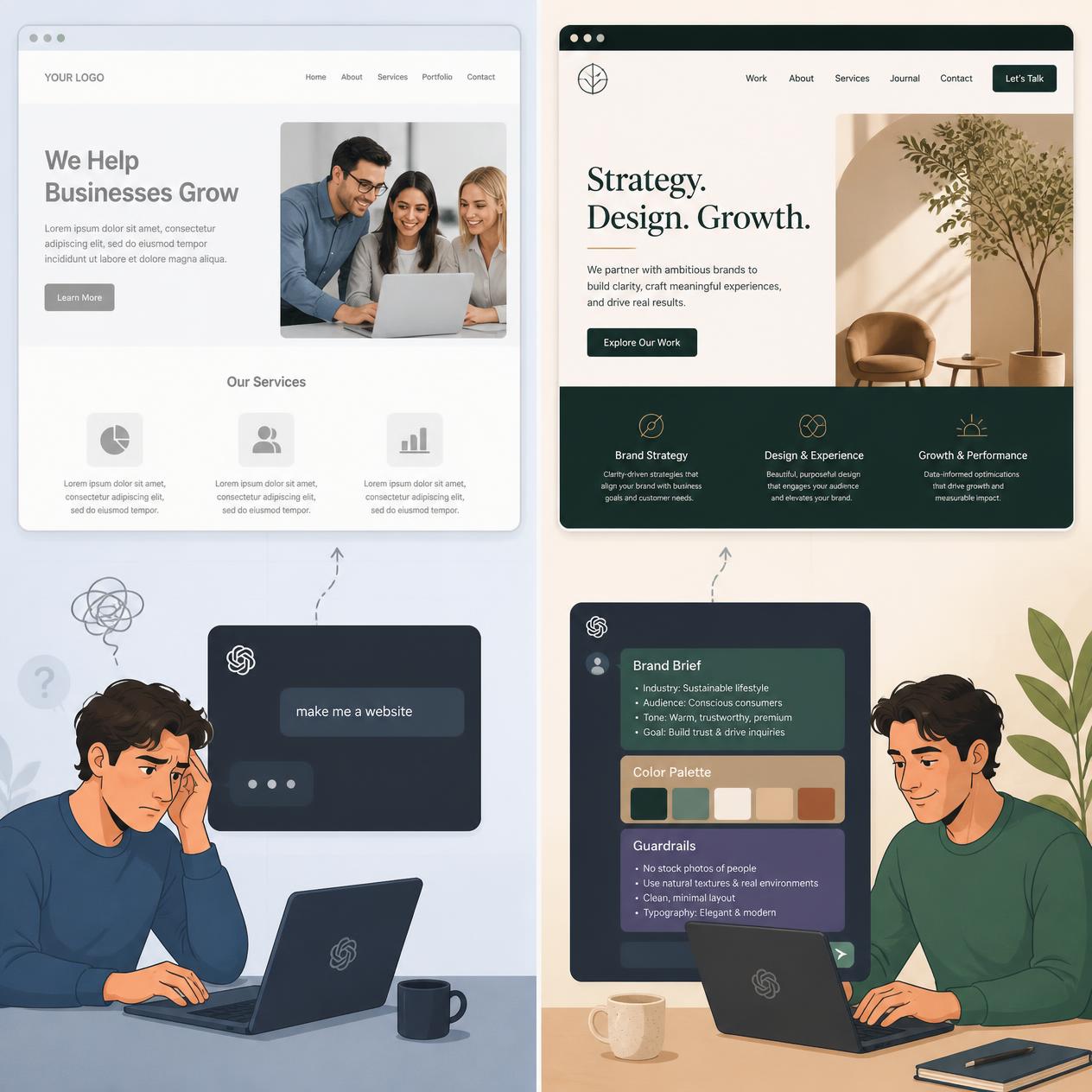
73% of businesses complain that AI-generated websites look overly generic. The issue isn't the tool — it's how you communicate with it. Discover the 5-layer prompt architecture, iterative prompting techniques, and ready-to-use templates.
The quality of an AI-generated website depends directly on the precision and structure of its initial input prompt — in 2026, prompting AI website builders has matured into a rigorous discipline of Context Engineering. While a simplistic command like “build a website for a construction firm” yields a generic, repetitive template, applying a structured prompt architecture produces custom production-ready code, distinctive UI layouts, and high conversion rates. In accordance with the Anthropic Prompt Engineering Guide and OpenAI Best Practices, an effective prompt for modern AI builders (such as Lovable, Bolt.new, and Framer) must comprise 5 foundational layers: system role, business context, explicit visual styling, section architecture, and negative guardrails (eliminating marketing clichés and typographical noise). In this guide, we provide battle-tested templates, iterative workflow techniques, and a comprehensive blueprint for prompting AI web builders.
Why Does AI Generate Generic Websites by Default?
Before exploring advanced techniques, it is essential to understand the underlying mechanism. An AI website builder is not a mind reader; it is an LLM trained on millions of existing web pages. When you enter “build me a bakery website”, the model calculates the statistical median: “what does an average bakery site look like in my training weights?” — and that is precisely what it generates.
Prompting website builders follows the exact same principles as context engineering in multi-agent systems: the more precise your system prompt, the more predictable, unique, and actionable the output.
The difference between an amateur prompt and an expert prompt is the difference between an agent guessing your intent and an agent executing against complete, unambiguous context. Provide a defined persona, brand identity, strict constraints, and output specifications — and the AI stops defaulting to generic averages.
What Is the 5-Layer Architecture of an Effective Prompt?
Layer 1 – AI Role and Persona (Who Is Building)
Always assign the AI a specialized persona before describing any project specifics. In prompt engineering, assigning an expert identity guides the model to adopt higher-standard design heuristics.
- Weak:
Build me a website for a yoga studio. - Strong:
You are a senior UX/UI designer specializing in wellness and boutique health brands. Your objective is to build a high-converting landing page for a yoga studio designed to drive trial class bookings.
Layer 2 – Brand Blueprint (Brand Identity)
Never expect an AI builder to infer your brand aesthetic from a company name alone. Provide a concise brand brief just as you would when onboarding a senior design agency:
Essential components of a Brand Blueprint:
- Mission & Core Values: What you do and why it matters.
- Target Audience: Specific user personas with defined pain points and motivations (not “everyone”).
- USP (Unique Selling Proposition): What differentiates you from direct competitors.
- Tone of Voice: Professional, approachable, authoritative, provocative, or minimalist?
- Visual Design System: Exact HEX color codes, named font families, and photographic direction.
Example Brand Blueprint (Boutique Coffee Bar):
Brand: Velvet Bean Coffee Bar (San Francisco, CA)
Values: Artisanal craft, local community, unhurried hospitality
Target Audience: Remote knowledge workers (25–40), valuing authenticity, avoiding mass commercial chains
USP: Exclusive single-origin micro-lots with a seasonal tasting menu refreshed every 6 weeks
Tone of Voice: Warm, understated, intellectually curious
Color Palette: #2C1810 (Deep Espresso), #F5E6D3 (Warm Cream), #4A7C59 (Muted Sage Accent)
Typography: Playfair Display (Headings), Inter (Body copy)
Photography Style: Warm, directional natural lighting, close-up texture crops, zero generic stock imagery
Guardrails: Avoid corporate corporate speak, background gradients, or stock photos of models in suits
Layer 3 – Page Structure and UI Section Architecture
Never give the AI unconstrained freedom over page hierarchy. Enumerate all sections in exact order with explicit content outlines:
- Weak:
The site should have a hero, an about section, and contact. - Strong:
The page must include the following sections in order:
1. Hero: Full-width container, question-based headline ("When did you last take a moment entirely for yourself?"), single background image (coffee bar interior), primary CTA button: "Find Us on Maps".
2. Why Choose Us: 3-column card grid with line icons: (1) Single-Origin Micro-Lots, (2) Intentional No-Wi-Fi Environment, (3) 6-Week Rotating Seasonal Menu.
3. Weekly Tasting Menu: Clean pricing table, maximum 6 items, displaying origin notes and pricing.
4. Location & Hours: Google Maps embed + tabular opening hours + direct Waze navigation link.
5. Footer: Social links, physical address, legal notices, and copyright statement.
Layer 4 – Negative Constraints and Guardrails (What to Avoid)
Guardrails are the most frequently overlooked layer in web prompting. Explicitly instructing the AI on what not to do prevents the model from injecting default training biases:
Effective guardrails to include:
Do not use more than 2 CTA buttons across the entire page.No entrance animations — prioritize instant page load and zero layout shift.Never use corporate clichés like "passion", "mission-driven", or "synergy".Use photography exclusively from Unsplash or custom AI assets — zero recognizable commercial stock photos.Limit the FAQ accordion to a maximum of 5 questions; avoid rhetorical filler questions.
Layer 5 – Output Format and Technical Stack
Conclude every prompt with explicit technical specifications:
For code-first builders (Lovable, Bolt.new):
Generate a clean React component using Tailwind CSS. Mobile-first responsive layout.
Export clean TypeScript code to GitHub. Do not include external packages outside the standard Vite ecosystem.
For hosted builders (Hostinger AI, Wix, Durable):
Generate responsive desktop and mobile layouts. Ensure Core Web Vitals compliance (LCP < 2.5s, CLS < 0.1).
Include structured JSON-LD schema markup for a LocalBusiness entity.
Why Is Iterative Prompting Superior to a Single Mega-Prompt?
The most common failure mode: attempting to generate a complete multi-page web application from one massive prompt. Even advanced frontier LLMs drop context and make compromises when bombarded with dozens of simultaneous instructions.
The Proven Iterative Sequence
Step 1: Establish the Foundation
Generate only the hero section based on the provided [Brand Blueprint].
Include headline, subheadline, one primary CTA, and background container. Do not generate any other sections yet.
Step 2: Evaluate and Refine
The hero layout is solid. Refine the following: change the primary CTA button color to #4A7C59, shorten the headline to a maximum of 8 words, and remove the subheadline entirely.Step 3: Add the Next Section
Now add the "Why Choose Us" section adhering strictly to our established Brand Blueprint.
Use a 3-column grid with minimalist line icons and borderless cards.
Step 4: Global Consistency Pass
Review the entire page: set vertical spacing between sections to exactly 80px, ensure all H2 headings use Playfair Display, and verify mobile typography scales cleanly.Web designers adopting an iterative prompting approach report 42% faster project completion cycles because they treat AI as an interactive design collaborator rather than a one-shot slot machine.
How to Leverage Multimodal Mood Boards to Direct AI Styling
Multimodal website builders (Aura.build, Lovable 2.0, Framer AI) accept visual screenshots from Figma, Dribbble, or Awwwards directly in the chat interface. This serves as visual few-shot prompting:
Step-by-step workflow:
- Collect 2–3 visual benchmarks matching your target aesthetic from Dribbble or Awwwards.
- Capture screenshots of specific components (hero layouts, card grids, footers).
- Paste the image into the builder accompanied by instructions:
Use this screenshot as an architectural reference for the hero layout.
Maintain this exact vertical spacing and typographical hierarchy, but adapt all colors, copy, and assets to our [Brand Blueprint].
Platform-Specific Prompting Nuances (Lovable, Bolt, Hostinger, Framer)
Different AI website builders respond differently to prompt structures:
| Tool | Best Suited For | Core Prompting Strategy |
|---|---|---|
| Lovable | Full-stack apps, MVPs | Frame prompts as user stories: “As a user, I want to…” |
| Bolt.new | Developers, existing codebases | Provide explicit folder architecture and framework versions upfront |
| Hostinger AI | Simple business websites | Supply complete copywriting — avoid letting AI improvise marketing copy |
| Aura.build | Visual design to code export | Reference Figma UI component structures directly |
| Wix Harmony | Small businesses, visual iteration | Interact conversationally: “Adjust spacing, shift container left…” |
| Framer AI | Creative portfolios, startup sites | Specify animation timings explicitly: “fade-in 0.3s, stagger delay 0.1s” |
Production-Ready Prompt Templates for Immediate Use
Template 1: Local Service Business
You are an expert web designer specializing in local service businesses.

[BRAND BLUEPRINT]
Company: [Company Name], [City, State]
Industry: [e.g., Plumbing, Dental Clinic, Physiotherapy]
Target Audience: [Local homeowners / clients seeking reliable, licensed professionals]
Tone of Voice: [Authoritative, trustworthy, warm]
Colors: [Primary HEX, Secondary HEX, Accent HEX]
Guardrails: [No generic stock models in hard hats, no background gradients]

[SECTION ARCHITECTURE]
1. Hero: Benefit-focused headline + 24/7 availability badge + "Call Now" click-to-dial button.
2. Services: 4–6 card grid with line icons, brief descriptions, and transparent starting rates.
3. Social Proof: 3 verified client reviews with star ratings and neighborhood locations.
4. Contact & Booking: Direct contact form + Google Maps embed + business hours table.

[TECHNICAL SPECS]
Mobile-first responsive layout, Lighthouse Performance 95+, LocalBusiness JSON-LD schema markup.
Template 2: Digital Product / SaaS Landing Page
You are a conversion rate optimization specialist building a high-converting SaaS landing page.

[PRODUCT SPECIFICATION]
Product Name: [Product Name]
Core Problem Solved: [One-sentence description of the primary pain point]
Primary Value Prop: [Measurable outcome the user achieves]
Pricing Model: [Price per month / Free tier details]
Social Proof Assets: [Customer count, client logos, G2 badges]

[SECTION ARCHITECTURE]
1. Hero: Outcome-focused headline (focus on results, not feature names), micro-copy, single CTA button.
2. Problem Statement: "Does this sound familiar?" breakdown featuring 3 specific operational bottlenecks.
3. Solution Showcase: Interactive visual breakdown demonstrating how the platform resolves each bottleneck.
4. Social Proof Grid: Metrics-driven case study quotes and customer logos.
5. Bottom CTA: Final conversion offer with risk-reversal guarantee ("14-day free trial, no credit card required").

[GUARDRAILS]
Only 1 primary CTA action throughout the entire page.
Headlines must not exceed 10 words. Eliminate words like "revolutionary", "all-in-one", or "disruptive".
Template 3: Minimalist Creative Portfolio
You are designing a minimalist portfolio for a creative professional.

[CREATOR PROFILE]
Name: [Name]
Specialization: [e.g., Product Photography, Motion Design, UI/UX Architecture]
Core Aesthetic: [Minimalist, typography-driven, editorial]
Target Clients: [Design studios, premium lifestyle brands]

[AESTHETIC GUIDELINES]
Visual Benchmarks: [2–3 reference URLs or screenshot attachments]
Color Palette: Monochrome palette (White, #111111) + single subtle accent color (#E05A47).
Typography: Single sans-serif family (Inter or Geist), maximum 2 font weights.

[SECTION ARCHITECTURE]
1. Hero: Creator name + discipline + curated full-bleed hero visual.
2. Selected Works: 2x3 responsive image grid; clicking an item opens an interactive project case study lightbox.
3. About: Concise 3-sentence bio + high-contrast editorial portrait.
4. Contact: Direct email link + LinkedIn / GitHub profile links.
Which Prompting Anti-Patterns Must You Avoid?
Anti-Pattern 1: Cramming Too Many Instructions at Once
Every additional instruction added into a single prompt degrades the model’s adherence to all other constraints. If you have 10 requirements, decompose them into 3–4 iterative prompts.
Anti-Pattern 2: Using Unanchored Adjectives
Terms like “modern”, “clean”, and “premium” are repeated millions of times in training datasets, resulting in generic outputs. Replace subjective adjectives with objective specifications: instead of “modern”, write “resembling the layout and typography of Linear.app”; instead of “vibrant colors”, specify exact #HEX values.
Anti-Pattern 3: Omitting Negative Constraints (Guardrails)
Just as an autonomous agent drifts without strict boundaries, an AI website builder without guardrails will automatically clutter your layout with decorative gradients, auto-playing video backgrounds, and boilerplate marketing clichés. Tell the AI what not to do.
Advanced Technique: Prompt Caching with a Persistent Brand Brief
If you frequently build or update web properties, adopt a pattern from autonomous agent engineering: static context at the top, variable execution instructions at the bottom.
Maintain a dedicated brand-brief.md file containing your comprehensive brand identity. Paste this brief at the beginning of each session with your AI builder, then append only your task-specific instructions. Tools with large context windows (Lovable, Bolt.new, Framer) retain this brand brief across the entire build session.
Platforms like Hostinger AI and Wix provide native “Brand Voice” settings — store your brief there once to apply it automatically across all generated pages.
Writing effective AI prompts is not an artistic gamble; it is an engineering discipline. The same structural rigor that makes multi-agent AI systems reliable applies to website builders. Start with an explicit brand blueprint, build iteratively section by section, enforce strict guardrails, and treat the AI builder as a capable junior designer executing against your architectural direction.