How to Automate AI Website Updates and Maintenance with CI/CD and n8n
GitHub Actions → Coolify → Directus → n8n → Claude Managed Agents. The complete website automation pipeline: zero-downtime CI/CD with automated rollbacks, 5-agent content generation, 6-hour Core Web Vitals audits, and SSL monitoring with copy-paste YAML configs.
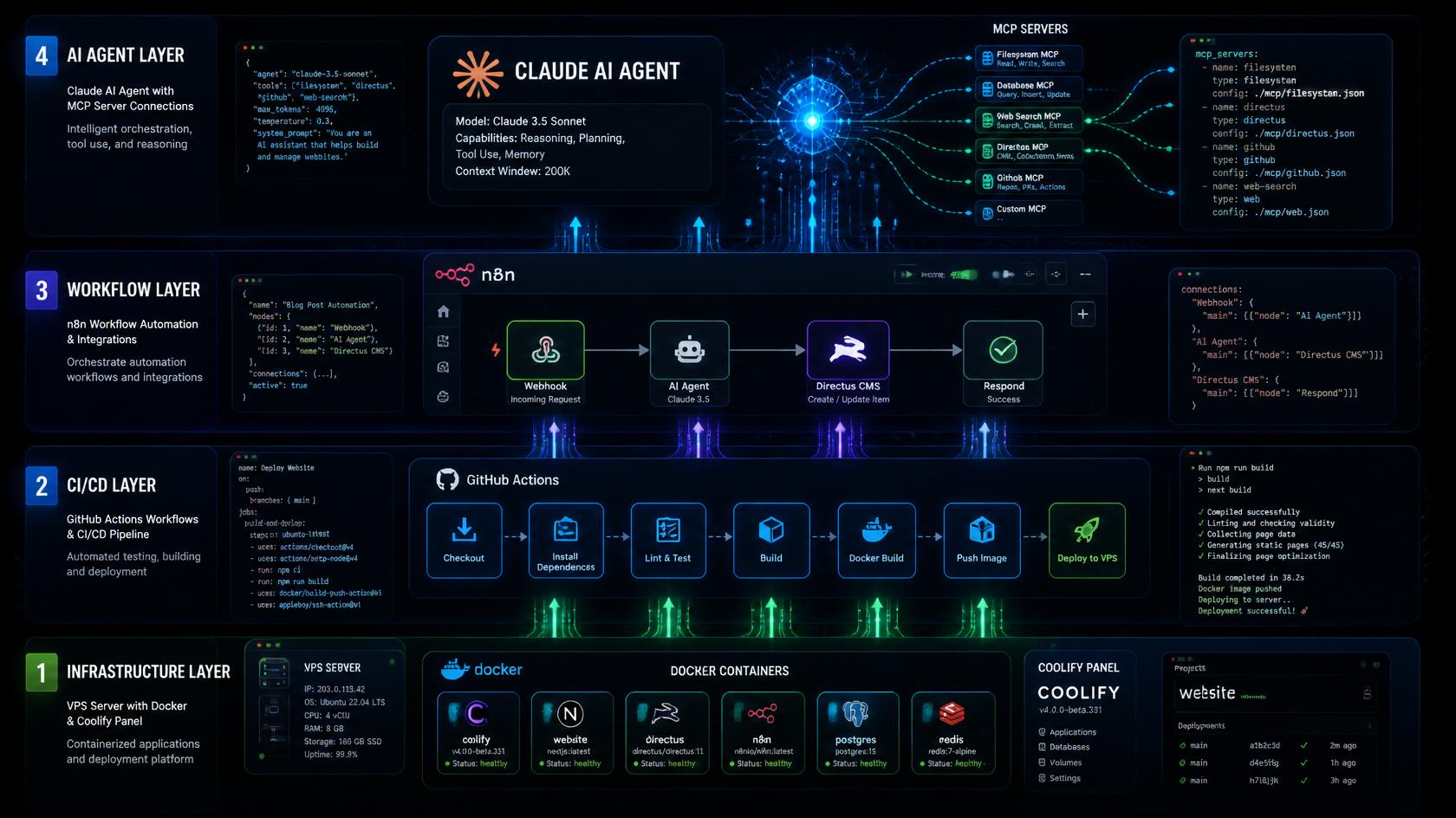
Deploying a website is only the initial step — in 2026, the key to maintaining top search engine rankings, flawless uptime, and seamless performance is AI website automation powered by modern DevOps pipelines and autonomous agent workflows. Manually uploading files via FTP or manually clicking “Update” in a control panel is obsolete. It has been replaced by a resilient 4-layer architecture: GitHub Actions CI/CD tests and deploys code automatically on every push, webhooks trigger zero-downtime container updates inside Coolify on a self-hosted VPS, and n8n Workflow Automation coordinates with AI models to track Core Web Vitals, draft blog content, and verify internal links without developer intervention. This automated infrastructure cuts operational maintenance by over 80%, eliminates downtime via automated rollbacks, and keeps content perpetually fresh. In this guide, you will find copy-paste YAML files, webhook architectures, and step-by-step implementation instructions.
What Does the 4-Layer Website Automation Architecture Look Like in 2026?
Before jumping into configuration, let us examine the four foundational layers that comprise a modern automated web platform:
┌─────────────────────────────────────────────────────┐
│  LAYER 4: AI AGENTS                                │
│  Claude Managed Agents, n8n AI Agent Nodes          │
│  Multi-agent content pipelines, MCP servers         │
├─────────────────────────────────────────────────────┤
│  LAYER 3: WORKFLOW AUTOMATION                       │
│  n8n (self-hosted), webhook orchestrators, cron     │
├─────────────────────────────────────────────────────┤
│  LAYER 2: CI/CD & DEPLOYMENT                       │
│  GitHub Actions → Coolify webhook → VPS             │
│  Or: Managed Git auto-deploy (Vercel / Netlify)     │
├─────────────────────────────────────────────────────┤
│  LAYER 1: INFRASTRUCTURE                            │
│  Hetzner VPS + Docker + Coolify + Nginx / Traefik   │
│  Or: Serverless Edge Hosting (Cloudflare / Netlify) │
└─────────────────────────────────────────────────────┘
Each layer is modular and decoupled — you can run managed edge hosting at Layer 1 while orchestrating full AI agent pipelines at Layer 3 and Layer 4.
How to Implement Zero-Downtime CI/CD Without Manual FTP
Manual deployments create operational risk. Transferring files via FTP, running manual git pull commands over SSH, or clicking “Deploy” inside a dashboard introduces human error and potential downtime.
The standard: every push to the main branch must trigger an automated, tested production deployment.
Path A: GitHub Actions → Coolify (Self-Hosted on VPS)
Coolify features native webhook integration with GitHub Actions. The implementation requires five straightforward steps:
- Enable Coolify API: Navigate to Settings → Configuration → Advanced → check “API Access”.
- Generate an API Token: Navigate to Keys & Tokens → API Tokens → Create → grant “Deploy” scope.
- Copy the Deploy Webhook URL: In your application configuration, go to Webhooks and copy the Deploy Webhook URL.
- Configure GitHub Repository Secrets: Navigate to Settings → Secrets and variables → Actions and add:
COOLIFY_WEBHOOK: Your application deploy webhook URL.COOLIFY_TOKEN: Your generated Coolify API token.
- Create the Workflow File (
.github/workflows/deploy.yml):
name: Build & Deploy

on:
  push:
    branches: [main]

jobs:
  deploy:
    runs-on: ubuntu-latest
    steps:
      - name: Checkout repository
        uses: actions/checkout@v4

      - name: Setup Node.js
        uses: actions/setup-node@v4
        with:
          node-version: '20'
          cache: 'npm'

      - name: Install dependencies
        run: npm ci

      - name: Run automated test suite
        run: npm test --if-present

      - name: Build production bundle
        run: npm run build
        env:
          NODE_ENV: production

      - name: Trigger Coolify deployment webhook
        if: success()
        run: |
          curl --request GET \
            "${{ secrets.COOLIFY_WEBHOOK }}" \
            --header "Authorization: Bearer ${{ secrets.COOLIFY_TOKEN }}"
The critical gate is if: success() — deployment triggers only if the build and test stages exit with code 0. Broken code is never shipped to production.
The outcome: push to main → GitHub checks out code → executes tests → builds assets → triggers Coolify → Coolify pulls the fresh Docker image and swaps containers without downtime. The complete cycle executes in 2–4 minutes.
Path B: GitHub → Netlify / Vercel (Managed Edge)
For sites hosted on Netlify or Vercel, automated continuous deployment is provisioned out of the box upon repository connection.
To enforce quality gates before edge deployment, add a Lighthouse CI check to your GitHub Actions workflow:
name: QA Quality Gate

on:
  push:
    branches: [main]

jobs:
  quality-gate:
    runs-on: ubuntu-latest
    steps:
      - name: Checkout repository
        uses: actions/checkout@v4

      - name: Run Lighthouse CI Audit
        run: |
          npm install -g @lhci/cli
          lhci autorun --upload.target=temporary-public-storage
        env:
          LHCI_GITHUB_APP_TOKEN: ${{ secrets.LHCI_GITHUB_APP_TOKEN }}
How to Use n8n for Content Automation and Continuous Monitoring
n8n serves as the central automation orchestrator. Running it inside Docker on your VPS via Coolify gives you access to 420+ native integrations through an intuitive visual canvas.
Deploying n8n via Docker Compose
services:
  n8n:
    image: n8nio/n8n:latest
    restart: unless-stopped
    ports:
      - "5678:5678"
    environment:
      - N8N_HOST=n8n.your-domain.com
      - N8N_PORT=5678
      - N8N_PROTOCOL=https
      - WEBHOOK_URL=https://n8n.your-domain.com/
      - N8N_COMMUNITY_PACKAGES_ENABLED=true
      - DB_TYPE=postgresdb
      - DB_POSTGRESDB_HOST=postgres
      - DB_POSTGRESDB_DATABASE=n8n
      - DB_POSTGRESDB_USER=n8n
      - DB_POSTGRESDB_PASSWORD=${N8N_DB_PASSWORD}
    volumes:
      - n8n_data:/home/node/.n8n
    depends_on:
      - postgres

  postgres:
    image: postgres:16-alpine
    restart: unless-stopped
    environment:
      - POSTGRES_DB=n8n
      - POSTGRES_USER=n8n
      - POSTGRES_PASSWORD=${N8N_DB_PASSWORD}
    volumes:
      - postgres_data:/var/lib/postgresql/data

volumes:
  n8n_data:
  postgres_data:
Workflow 1: Directus → n8n → Claude SEO Audit → Automated Publishing
This is the primary publishing pipeline for headless architectures (such as Directus or Astro collections):
Trigger: Directus Trigger Node — status = review_ready, collection posts.
Workflow Logic:
[Directus Trigger: posts.updated, status=review_ready]
    ↓
[HTTP Request: Claude API – Automated SEO Audit]
  Prompt: "Audit this blog post for SEO compliance. Return structured JSON:
  - seo_score (integer 0-100)
  - suggested_title (max 60 characters)
  - suggested_description (max 155 characters)
  - readability_issues (array of strings)"
    ↓
[IF: seo_score >= 75]
    ↓ YES
[Directus: Update Item → status: published, SEO_Title, SEO_Description, date_published]
    ↓
[Slack / Discord Webhook: "Published: {{Title}} (SEO Score: {{seo_score}})"]

    ↓ NO (seo_score < 75)
[Directus: Update Item → status: draft, feedback: {{readability_issues}}]
    ↓
[Slack Alert: "SEO Audit failed for {{Title}} (Score: {{seo_score}}). Reverted to draft."]
Workflow 2: Automated Core Web Vitals Auditing Every 6 Hours
Monitor real-world mobile performance automatically using Google’s official API:
[Schedule Trigger: Every 6 Hours]
    ↓
[HTTP Request: Google PageSpeed Insights API]
  Endpoint: https://www.googleapis.com/pagespeedonline/v5/runPagespeed?url=https://your-domain.com&strategy=mobile
    ↓
[Code Node: Extract LCP, INP, CLS values]
    ↓
[IF: lcp > 2500 OR inp > 200 OR cls > 0.1]
    ↓ YES
[Slack / Telegram Alert: "Core Web Vitals degraded! LCP: {{lcp}}ms / INP: {{inp}}ms / CLS: {{cls}}"]
    ↓
[Directus / DB: Create record in 'monitoring_logs']
The Google PageSpeed Insights API is free for up to 25,000 requests per day — more than sufficient for multi-site monitoring.
Workflow 3: Multi-Agent Content Pipeline (5 Specialized AI Agents)
Modeled on enterprise multi-agent architectures, this pipeline automates research through draft staging:
[Schedule Trigger / Manual Trigger]
    ↓
[HTTP Request: Industry News & RSS Feeds]
    ↓
[AI Agent #1 – Research Agent (Claude 3.7)]
  "Analyze incoming industry articles and propose 3 timely topics.
  For each: Title, Angle, Target Keyword, Estimated Commercial Intent (High/Med/Low)"
    ↓
[IF: Filter highest commercial intent topic]
    ↓
[AI Agent #2 – SEO Architect Agent (Claude)]
  "For selected topic generate: H2/H3 semantic outline (min 5 sections),
  LSI keyword clusters, FAQ schema (min 4 questions), Meta Title (50-60 chars), Description (150-155 chars)"
    ↓
[AI Agent #3 – Drafting Agent (Claude)]
  "Draft comprehensive article (min 1500 words) following outline.
  Tone: Authoritative, practical, code-first with realistic examples."
    ↓
[AI Agent #4 – Visual Prompt Agent (Claude + DALL-E / Flux API)]
  "Generate optimized image prompt, call image generation API, export WebP"
    ↓
[Directus / CMS: Upload Asset → image_id]
    ↓
[Directus / CMS: Create Item in 'posts']
  - status: "draft"
  - Title, Content, FAQ_Data, SEO_Title, SEO_Description, Cover_Image
    ↓
[Slack Notification: "New Draft Ready for Review: {{Title}}"]
Human-in-the-loop is intentional. The generated article lands inside your CMS as a draft. You review, inject personal experience, and update the status to review_ready — which triggers Workflow 1 for final automated SEO auditing and publishing.
What Are Claude Managed Agents and How Do They Work with MCP?
Claude Managed Agents represent an evolution beyond linear workflow automation. Instead of hardcoding static branches, you provide an agent with high-level objectives and a collection of standardized tools via the Model Context Protocol (MCP).
How Managed Agents Differ from n8n
- n8n: A deterministic pipeline where you explicitly link node A to node B.
- Claude Managed Agents: An autonomous system where the agent determines tool sequences dynamically to accomplish an objective.
When to use n8n: Scheduled publishing, regular uptime pings, automated link verification — workflows requiring strict predictability. When to use Managed Agents: Post-deployment regression diagnosis, deep content quality audits, complex refactoring tasks.
Essential MCP Servers for Webmasters
- GitHub MCP: Inspects code repositories, reviews pull requests, and opens tracking issues.
- Directus MCP: Inspects collection schemas, queries relational data, and updates CMS content.
- PostgreSQL MCP: Queries production logs and runs diagnostic SQL queries directly.
- Playwright MCP: Controls a headless browser to execute visual UX testing and functional validation.
Claude Managed Agents support MCP Tunnels — enabling the cloud agent to communicate securely with services on your private Docker network without modifying inbound firewall rules.
Example Agent Configuration (Python SDK):
import anthropic

client = anthropic.Anthropic()

agent = client.beta.agents.create(
    name="Site Health Monitor",
    model="claude-opus-4-5",
    mcp_servers=[
        {
            "type": "url",
            "name": "github",
            "url": "https://api.githubcopilot.com/mcp/",
        },
        {
            "type": "url",
            "name": "playwright",
            "url": "https://playwright-mcp.your-domain.com/mcp",
        },
    ],
    tools=[
        {"type": "agent_toolset_20260401"},
        {"type": "mcp_toolset", "mcp_server_name": "github"},
        {"type": "mcp_toolset", "mcp_server_name": "playwright"},
    ],
)
Directus MCP Server Setup
# Add inside your VPS docker-compose.yml:
services:
  directus-mcp:
    image: directus/mcp-server:latest
    environment:
      - DIRECTUS_URL=http://directus:8055
      - DIRECTUS_TOKEN=${DIRECTUS_ADMIN_TOKEN}
    ports:
      - "3100:3100"
With the Directus MCP server active, Claude automatically understands your data models, relationship fields, and content schemas without manual prompting.
Essential Website Monitoring: The Non-Negotiable Baseline
1. Uptime Monitoring via UptimeRobot (Free for up to 50 Monitors)
- Create a free account at uptimerobot.com.
- Add Monitor → Type:
HTTP(s)→ URL:https://your-domain.com. - Configure Alert Contacts: Email + Slack/Discord webhook.
- Set monitoring interval to 5 minutes.
2. Automated SSL Expiration Tracking in n8n
[Schedule: Weekly Cron]
    ↓
[Execute Command Node:
  echo | openssl s_client -connect your-domain.com:443 2>/dev/null | openssl x509 -noout -dates | grep notAfter
]
    ↓
[Code Node: Calculate days remaining until expiry]
    ↓
[IF: days_remaining < 30]
    ↓ YES
[Slack Notification: "SSL Certificate expires in {{days_remaining}} days!"]
3. CI/CD Deployment with Automated Rollback
name: Deploy with Automated Rollback

on:
  push:
    branches: [main]

jobs:
  deploy:
    runs-on: ubuntu-latest
    steps:
      - name: Checkout code
        uses: actions/checkout@v4

      - name: Build & Test
        run: |
          npm ci
          npm run build
          npm test

      - name: Trigger Coolify Deploy
        id: deploy
        run: |
          curl --request GET \
            "${{ secrets.COOLIFY_WEBHOOK }}" \
            --header "Authorization: Bearer ${{ secrets.COOLIFY_TOKEN }}"

      - name: Wait for container initialization
        run: sleep 45

      - name: Execute Live Health Check
        run: |
          STATUS=$(curl -s -o /dev/null -w "%{http_code}" https://your-domain.com/api/health)
          if [ "$STATUS" != "200" ]; then exit 1; fi

      - name: Notify Success
        if: success()
        run: |
          curl -X POST ${{ secrets.SLACK_WEBHOOK }} \
            -H 'Content-type: application/json' \
            --data '{"text":"Deployment Succeeded: commit ${{ github.sha }}"}'

      - name: Rollback on Failure
        if: failure()
        run: |
          git revert HEAD --no-edit && git push origin main
Complete Infrastructure Cost Breakdown on a VPS
| Component | Technology | Monthly Cost |
|---|---|---|
| VPS Hosting | Hetzner CX32 (4 vCPU, 8 GB RAM) | €7.99 |
| App Orchestration | Coolify (Self-hosted) | €0.00 |
| Workflow Engine | n8n (Self-hosted on Docker) | €0.00 |
| CI/CD Pipeline | GitHub Actions (Free tier) | $0.00 |
| Uptime Monitoring | UptimeRobot (Free tier) | $0.00 |
| LLM Inference | Claude 3.7 API (Pay-per-use) | ~$5.00 – $15.00 |
| Image Generation | Flux / DALL-E 3 API (Pay-per-use) | ~$2.00 – $5.00 |
| TOTAL | ~€15.00 – €28.00 / month |
Managed equivalents (n8n Cloud $20 + Vercel Pro $20 + proprietary monitoring $25) typically cost $65–$80+ per month for identical functionality.
6-Week Phased Automation Roadmap
You do not need to implement all four layers simultaneously. Follow this incremental schedule:
- Week 1: Automated CI/CD — Configure GitHub Actions → Coolify deployment webhook. 30 minutes to eliminate manual deployments permanently.
- Week 2: Uptime & Health Monitoring — Set up UptimeRobot pings and an automated
/api/healthendpoint. - Week 3: Self-Hosted n8n — Deploy n8n in Docker, connect your CMS, and build a simple notification workflow (New Post → Slack).
- Week 4: Content Generation Pipeline — Build a multi-agent draft generation pipeline with mandatory human approval.
- Month 2: Core Web Vitals Tracking — Automate 6-hour PageSpeed Insights API audits with automated degradation alerts.
- Month 3+: Claude Managed Agents & MCP — Connect MCP servers for autonomous code auditing and database diagnostics.
Each milestone delivers standalone reliability gains, protecting your time and keeping your web platform robust and scalable.